





When selecting an LED video wall, refresh rate is often one of the most misunderstood specifications.
Many buyers assume “higher is always better,” while others confuse refresh rate with frame rate or grayscale performance.
In reality, LED video wall refresh rate directly impacts camera performance, visual stability, and long-term reliability—but only when evaluated correctly.
This guide explains:
- What refresh rate really means in LED displays
- When high refresh rate matters—and when it doesn’t
- How to identify real vs inflated specifications
- How refresh rate works together with grayscale, driver ICs, and scanning
What Is Refresh Rate in an LED Video Wall?
LED video wall refresh rate refers to how many times per second the LED pixels are refreshed electrically. (By. Zora)
- Measured in Hertz (Hz)
- Common values: 1920Hz, 2880Hz, 3840Hz, 7680Hz
Important:
Refresh rate is not the same as video frame rate (fps).
Even a 60fps video can look unstable on a low-refresh LED wall—especially on camera.
Why Refresh Rate Matters (and When It Doesn’t)
Situations Where Refresh Rate Is Critical
| Application | Minimum Recommended Refresh Rate |
|---|---|
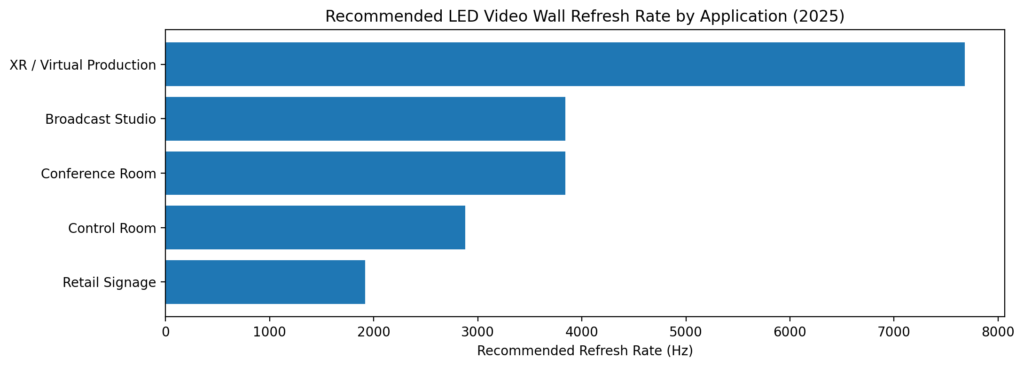
| Broadcast studio | ≥ 3840Hz |
| XR / Virtual production | ≥ 7680Hz |
| Conference rooms with cameras | ≥ 3840Hz |
| Live streaming / filming | ≥ 3840Hz |
Low refresh rate causes:
- Rolling scan lines on camera
- Flicker in slow-motion recordings
- Brightness banding
Situations Where Ultra-High Refresh Rate Is Less Critical
| Application | Practical Requirement |
|---|---|
| Indoor signage (no cameras) | 1920–2880Hz |
| Control rooms (static data) | 1920–3840Hz |
| Museums / exhibitions | 1920Hz often sufficient |
👉 Over-specifying refresh rate increases cost and power consumption without visible benefit.
Real Refresh Rate vs Advertised Numbers
This is where many buyers get misled.
Common Industry Issues
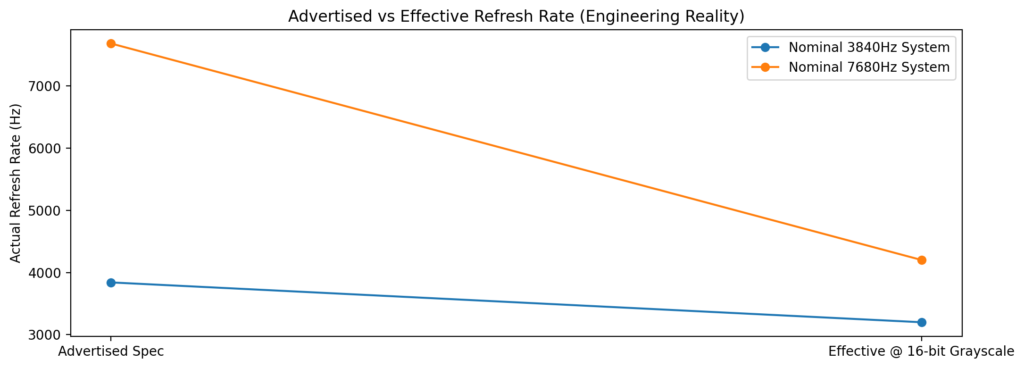
- “7680Hz” advertised, but measured at lower grayscale
- High refresh only achieved at reduced brightness
- Driver IC limitations not disclosed
What Actually Determines Real Refresh Rate
| Factor | Impact |
|---|---|
| Driver IC model | Determines max stable refresh |
| Scan rate (1/16 vs 1/32) | Affects brightness & flicker |
| Grayscale depth | High refresh at low grayscale is misleading |
| Control system | Bandwidth bottlenecks reduce output |
Engineering truth:
A stable 3840Hz @ 16-bit grayscale is often better than a “7680Hz” system with compromised image depth.
Refresh Rate vs Grayscale: The Hidden Trade-Off
Many systems cannot maintain:
- High refresh rate
- High grayscale
- High brightness
at the same time
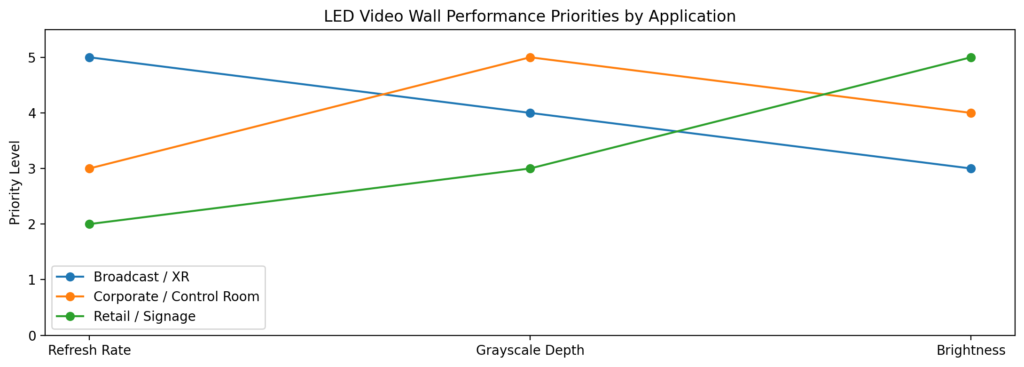
This is known as the performance triangle.
Engineering Priority Recommendation
| Use Case | Priority Order |
|---|---|
| Broadcast / XR | Refresh → Grayscale → Brightness |
| Corporate / Control | Grayscale → Stability → Refresh |
| Retail signage | Brightness → Stability → Refresh |
A professional LED video wall supplier will disclose refresh + grayscale at operating brightness, not just peak numbers.
How to Verify Refresh Rate Correctly (Buyer Checklist)
Before approving a project, always ask for:
- Camera test video (slow motion)
- Refresh rate measured at ≥14-bit grayscale
- Driver IC model (e.g., MBI / Macroblock series)
- Scan ratio and brightness at full white
- Control system bandwidth confirmation
Reputable engineering solution providers (such as LeyeDisplay) typically provide:
- Test reports
- On-site demo validation
- Application-based configuration, not one-size specs
Key Takeaways: Choosing the Right Refresh Rate
- LED video wall refresh rate is application-driven
- 3840Hz is the real-world sweet spot for most professional indoor projects
- 7680Hz is necessary only for XR, broadcast, or high-speed filming
- Grayscale and driver IC quality matter as much as refresh rate
- Always validate specs with real tests—not brochures
Choosing the right LED video wall refresh rate is not about chasing the highest number—it’s about engineering balance.
By understanding how refresh rate interacts with grayscale, brightness, and driver IC design, buyers can avoid overpaying, prevent performance issues, and ensure long-term image stability.
If your project involves cameras, long operating hours, or mission-critical visuals, working with an engineering-oriented LED solution provider makes the difference between “looks fine on paper” and works flawlessly in real life. (LeYeDisplay)