
Control rooms are designed to help operators monitor critical information, respond to changing situations, and make decisions without interruption. Whether used in power plants, traffic management centers, security operations, or industrial facilities, the display system plays an important role in daily operations.
However, choosing a Control Room LED Display involves more than selecting a large screen with a suitable pixel pitch. The system must present information clearly, support multiple signal sources, operate reliably for extended periods, and remain practical to maintain throughout its service life.
A configuration that works well in a corporate meeting room may not be suitable for a control center operating around the clock.
This guide explains eight important requirements that system integrators and project buyers should evaluate before specifying an حائط فيديو LED for a control room.
Quick Answer: What Should You Consider When Choosing a Control Room LED Display?
Before selecting a solution, evaluate these eight areas:
- Application requirements and operator workflows.
- Pixel pitch and actual viewing distance.
- Overall resolution and content layout.
- Continuous operation and system reliability.
- Brightness, contrast, and visual comfort.
- Front maintenance and serviceability.
- Video processing, signal distribution, and redundancy.
- Installation conditions and future expansion.
The most suitable configuration depends on the information being displayed, the room layout, the number of operators, and the operational requirements of the facility.
1. Understand the Specific Requirements of the Control Room
Not every control room performs the same function. A power distribution center, transportation monitoring facility, and security operations center may all require a large video wall, but their display requirements can be very different.
Before selecting equipment, identify what operators need to see and how they interact with the display.
Power and Energy Management Centers
Power control rooms often display grid diagrams, equipment status, alarms, load information, and real-time operational data.
Fine details, thin lines, and small text must remain readable. The display should also support multiple information windows without making the overall layout difficult to interpret.
مراكز إدارة حركة المرور
Traffic control rooms commonly combine live camera feeds, traffic maps, incident information, and monitoring dashboards.
Operators may need to view multiple video sources simultaneously. The display system should therefore support flexible window layouts and reliable signal switching.
Security Operations Centers
Security operations centers often use large numbers of surveillance feeds, access-control information, and incident monitoring systems.
The priority is usually the ability to display multiple sources clearly and reorganize content quickly when an incident occurs.
Industrial Control Rooms
Industrial facilities may use SCADA interfaces, process diagrams, equipment status screens, and production monitoring dashboards.
For these applications, accurate information presentation and stable integration with the existing control infrastructure are especially important.
Project takeaway: Define the operational purpose first. The display configuration should follow the operator’s workflow rather than being selected only by screen size or product specifications. A well-planned Control Room LED Display should support the specific monitoring tasks and decision-making processes of the facility.
2. Choose the Right Pixel Pitch for Viewing Distance
Pixel pitch is one of the most important specifications when designing a control room video wall.
It refers to the distance between the centers of two adjacent LED pixels, measured in millimeters. A smaller pixel pitch provides higher pixel density and allows viewers to see finer details from shorter distances.
However, choosing the smallest available pixel pitch is not automatically the best decision.
The correct specification should be based on the actual viewing distance, displayed content, screen dimensions, and project budget.
على سبيل المثال:
| درجة البكسل | Typical Consideration |
|---|---|
| P0.9–P1.2 | Close viewing and highly detailed information |
| ف1.2 - ف1.5 | Fine-pitch applications with relatively short viewing distances |
| ف1.5 - ف1.8 | Many professional monitoring environments |
| P1.8–P2.5 | Medium to larger control rooms with greater viewing distances |
| P2.5 and above | Larger viewing distances where extremely fine detail is less critical |
These are indicative product categories, not fixed viewing-distance standards. Actual suitability depends on content resolution, viewing position, and visual requirements.
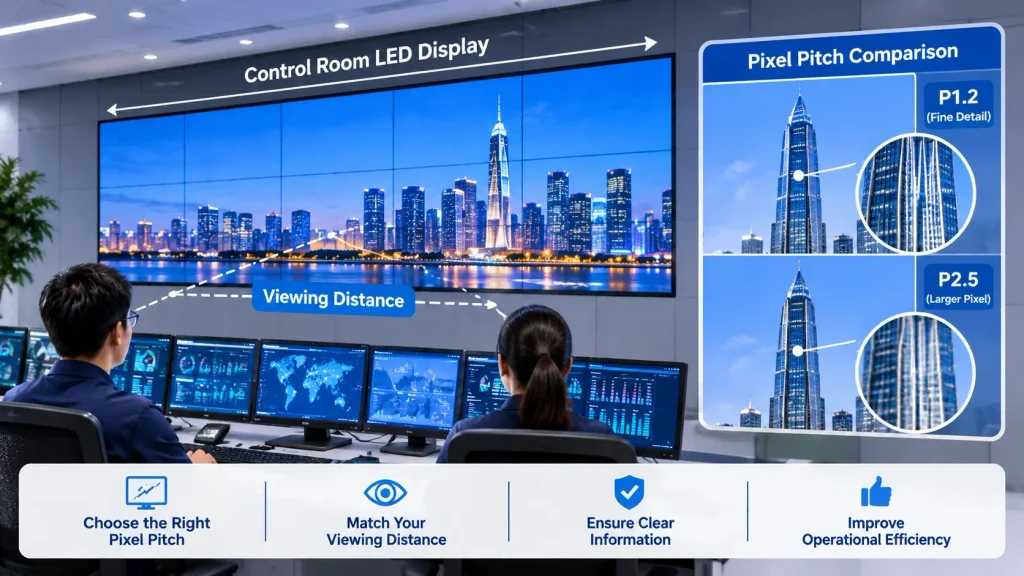
A useful way to approach the decision is to identify the farthest and closest operator positions, then evaluate whether text, lines, symbols, and video details remain clear from those locations.
For a more accurate design, consider the viewing requirements of different content types. A full-screen video feed and a detailed electrical schematic may require different levels of image detail.
Selecting the right pixel pitch helps ensure that the Control Room LED Display delivers clear information at the actual viewing distance.
3. Plan Resolution and Content Layout Before Selecting the Screen
A large physical screen does not automatically provide sufficient resolution for every control room application.
The total resolution of an LED wall depends on its physical dimensions and pixel pitch. A display may be large enough to attract attention but still lack the pixel density needed to show detailed diagrams or multiple high-resolution sources clearly.
For example, a control center may need to display:
- Multiple live camera feeds.
- Geographic information systems (GIS).
- SCADA diagrams.
- Operational dashboards.
- Alarm and incident information.
- Video conferencing or communication windows.
The system integrator should establish which content must be displayed simultaneously and determine the required resolution for each viewing area.
Consider the Total Canvas Resolution
For a direct-view LED wall, the horizontal and vertical pixel counts are determined by the physical display dimensions and pixel pitch.
A smaller pixel pitch generally provides more pixels within the same screen area.
However, the final result also depends on the video processor, input signal resolution, scaling capabilities, and source content.
Plan Content Windows and Layouts
Some control rooms use one large continuous canvas. Others divide the wall into several independent information zones.
The layout should allow operators to prioritize important information while keeping secondary data accessible.
For example, a traffic monitoring center may place live camera feeds across the main display area while reserving a separate zone for maps and incident alerts.
The display system should support the intended layout without unnecessarily reducing the clarity of critical information.
4. Evaluate 24/7 Operation and System Reliability
Continuous operation is one of the defining requirements of a professional Control Room LED Display system.
A display used for a few hours each day has different operating demands from a system expected to remain active throughout the year.
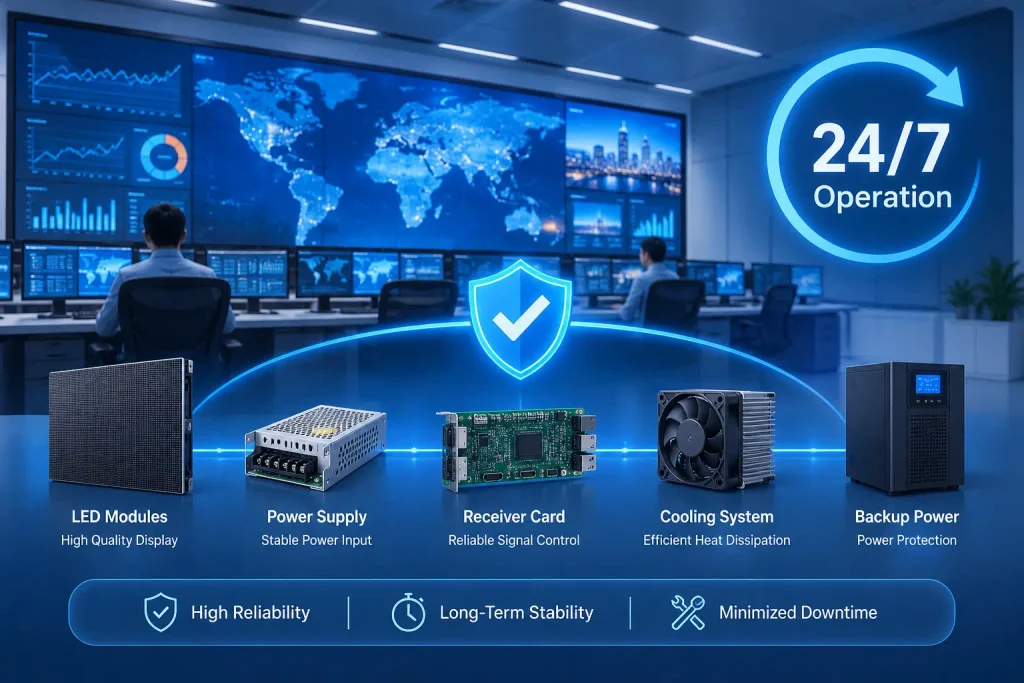
A 24/7 Control Room Display should therefore be evaluated as part of a complete operating system, not simply as a screen.
ومن بين الاعتبارات المهمة ما يلي:
Component Quality and Consistency
LED chips, driver ICs, power supplies, receiving cards, and other electronic components all influence overall system performance.
Consistent component quality and manufacturing processes help reduce differences between modules and maintain stable image performance across the display.
Thermal Management
Heat management is important during extended operation.
The display structure should provide appropriate heat dissipation under the expected operating conditions. Ventilation, ambient temperature, installation clearance, and cabinet design should all be considered.
Power Supply and Signal Reliability
The project should define what happens if a power supply, receiving card, signal source, or processing device fails.
For critical applications, redundant power supplies, backup signal paths, or spare system components may be required.
The appropriate level of redundancy depends on the consequences of system downtime and the facility’s operational policies.
Operational Testing
Before handover, the system should undergo testing under realistic operating conditions.
This may include continuous operation tests, signal switching checks, brightness and color consistency checks, and verification of recovery procedures.
A reliable control room system is not defined by a single component specification. It depends on the stability of the complete display and control infrastructure.
5. Balance Brightness, Contrast, and Visual Comfort
Operators may spend many hours monitoring the main display. Therefore, image quality should be evaluated from the perspective of long-term viewing comfort, not just maximum brightness.
إن required brightness depends on room lighting, natural light exposure, display size, and the content being presented.
For many indoor control room installations, a moderate brightness level is sufficient. Some brighter environments may require higher output, but selecting the highest available brightness is rarely necessary.
Other important factors include:
Contrast: Good contrast helps operators distinguish important information, especially when displaying dark interfaces, maps, and detailed diagrams.
Grayscale performance: Smooth grayscale reproduction helps preserve details in dark areas and subtle image transitions.
Color consistency: Consistent color reproduction across the entire wall helps avoid differences between individual display sections.
Surface reflection: Reflections from windows and overhead lighting can reduce perceived contrast. Screen positioning and room lighting should be considered during planning.
A control room should also avoid excessive brightness differences between the main video wall and nearby operator monitors.
The goal is a comfortable and consistent viewing experience throughout the working day.
6. Consider Front Maintenance and Long-Term Serviceability
Maintenance access is often overlooked during the early design stage.
However, control rooms may need to remain operational while maintenance is carried out. If servicing the display requires extensive disassembly or access from behind the wall, repair work can become more complicated.
A front-maintenance design allows technicians to remove and replace selected modules or components from the front of the display.
This can be particularly useful when:
- The display is installed close to an existing wall.
- Rear access space is limited.
- The screen is integrated into a fixed architectural structure.
- Maintenance needs to be performed with minimal disruption.
For some installations, rear maintenance may still be suitable, especially where sufficient access space is available.
The decision should be made during the installation design stage rather than after the display has been installed.
Buyers should also confirm the availability of replacement modules, power supplies, receiving cards, and other spare parts.
A good maintenance plan should define service procedures, spare-parts availability, and the expected response process for component failures.
7. Check Video Processing, Signal Distribution, and Redundancy
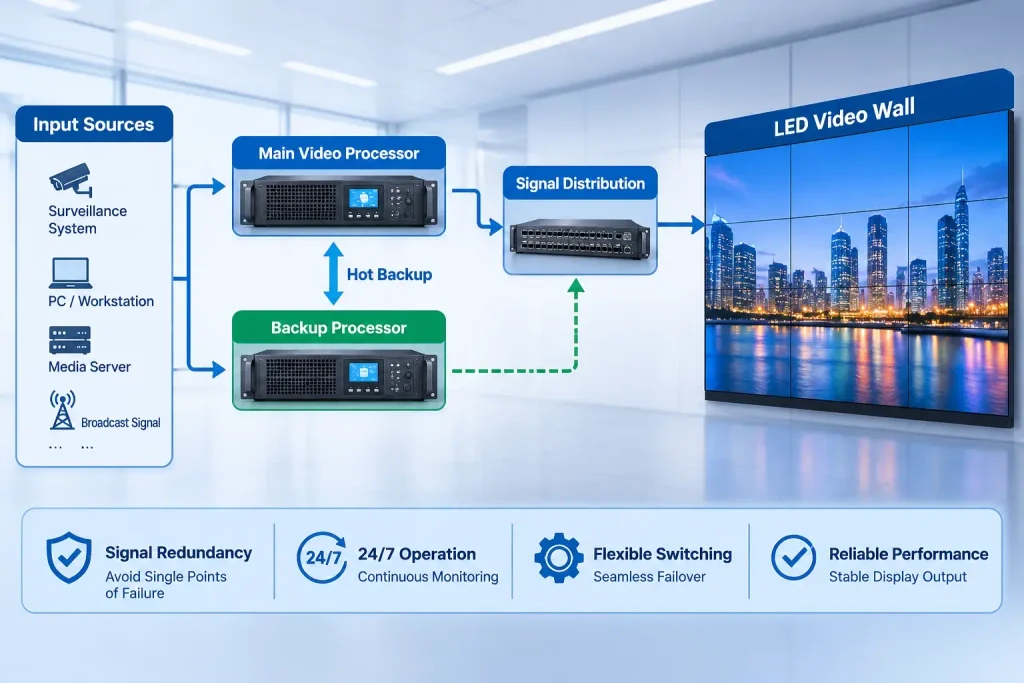
A control room video wall is not just an LED display. It is part of a larger audiovisual and operational system.
The complete configuration may include:
- Workstations and control computers.
- CCTV and other video sources.
- SCADA or industrial monitoring systems.
- Video processors and controllers.
- Network-based signal distribution.
- Operator control interfaces.
- Backup signal and power equipment.
The display processor must support the required input signals, resolutions, window layouts, and image scaling functions.
Multi-Source Management
A control room may receive content from many different sources.
The system should allow operators to select, resize, move, and organize these sources according to operational needs.
Before selecting the processor, confirm the number and types of input signals, output requirements, supported resolutions, and required window configurations.
Signal Redundancy
For critical applications, a single signal path may create an unnecessary point of failure.
Depending on project requirements, backup processors, redundant signal connections, or alternative source paths may be considered.
However, redundancy should be designed as a complete system function. Adding a backup device alone does not guarantee uninterrupted operation if other parts of the signal chain remain single points of failure.
Integration with Existing Systems
The display solution should be compatible with the facility’s existing infrastructure and control workflows.
System integrators should verify signal formats, network requirements, communication interfaces, and control protocols before finalizing the equipment list.
8. Plan Installation, Space, and Future Expansion
The physical installation environment can significantly influence the final display configuration.
Before installation, the project team should verify:
- Available wall dimensions and mounting conditions.
- Structural support and cabinet installation method.
- Power supply capacity and distribution.
- Cable routing and signal connection locations.
- Ventilation and heat dissipation.
- Front or rear maintenance access.
- Operator viewing positions and sightlines.
The display should be positioned so that operators can monitor important information without adopting uncomfortable viewing postures.
Where several operator stations are involved, viewing angles and screen visibility should be evaluated from all relevant positions.
Future expansion should also be considered.
A control room may need additional camera feeds, new monitoring applications, or a larger display area as operational requirements change.
The system should therefore provide a practical way to expand input capacity, modify display layouts, and maintain the required image quality without replacing the entire installation.
A properly planned Control Room LED Display should also allow for future expansion without requiring a complete redesign of the display system.
Control Room LED Display Project Planning Checklist
Before confirming a quotation or equipment configuration, use this checklist to review the main project requirements.
| Project Item | What to Confirm |
|---|---|
| التطبيق | Power, traffic, security, industrial, or other control functions |
| أبعاد الشاشة | Required display width and height |
| مسافة المشاهدة | Closest and farthest operator positions |
| درجة البكسل | Suitable resolution for the actual content |
| مصادر المحتوى | Cameras, SCADA, GIS, dashboards, and other inputs |
| Display layout | Full-screen canvas or multiple independent windows |
| Operating schedule | Continuous operation or scheduled use |
| السطوع | Suitable output for the room’s lighting conditions |
| الصيانة | Front access or rear access |
| Redundancy | Power, signal, and processing backup requirements |
| التركيب | Structure, cabling, ventilation, and power capacity |
| التوسع المستقبلي | Additional sources, capacity, and layout flexibility |
A clearly defined project specification makes it easier to compare supplier proposals and reduces the risk of selecting equipment that does not meet the actual operational requirements.
Common Mistakes When Planning a Control Room Video Wall
Several mistakes can affect the performance and long-term practicality of a control room display system.
Choosing pixel pitch based only on price
A lower-cost display with insufficient resolution may make detailed diagrams and small text difficult to read. Pixel pitch should be evaluated against actual viewing positions and content.
Focusing only on screen size
A larger screen does not necessarily provide better information visibility. Resolution, layout, and content management are equally important.
Ignoring the signal processing system
Even a high-quality LED wall cannot display information properly if the processor lacks sufficient input capacity, resolution support, or window management functions.
Overlooking maintenance access
A display installed without a practical service plan can become expensive and difficult to maintain.
Treating redundancy as an optional accessory
For critical facilities, power and signal failure scenarios should be discussed during system design, not after installation.
Ignoring operator comfort
Brightness, viewing angles, reflections, and screen positioning all influence the operator’s ability to monitor information over extended periods.
Avoiding these mistakes helps create a system that supports real operational requirements rather than simply delivering a visually impressive installation.
الأسئلة الشائعة
What pixel pitch is suitable for a control room LED display?
The suitable pixel pitch depends on viewing distance, content detail, screen size, and budget. P1.2–P1.8 may be considered for many fine-pitch control room applications, while larger rooms may accommodate coarser pitches. The final choice should be based on actual viewing conditions.
Can LED video walls operate 24/7?
Yes. Professional LED display systems can be configured for continuous operation. However, buyers should evaluate component quality, thermal management, power reliability, signal redundancy, and maintenance arrangements rather than relying on an operating-hours claim alone.
Is front maintenance necessary for a control room LED wall?
Not in every project. Front maintenance is especially useful where rear access is restricted or the display is installed close to a wall. If sufficient rear access is available, rear maintenance may also be practical.
What brightness is recommended for a control room display?
The appropriate brightness depends on ambient lighting, screen position, reflections, and viewing comfort. A controlled indoor environment generally does not require the same brightness as a brightly lit room with substantial daylight exposure.
What systems need to be integrated with a control room video wall?
Common systems include CCTV, SCADA, GIS, workstations, video processors, and network-based signal distribution. The exact configuration depends on the facility’s operational workflow and the number of sources that must be displayed.
Should a control room use LED or LCD video walls?
Both technologies can be suitable. Direct-view LED offers a seamless display surface without the visible bezels associated with tiled LCD panels. LCD may be appropriate for certain smaller-scale or budget-sensitive applications. The choice depends on screen size, viewing distance, resolution, maintenance, and operational requirements.
الأفكار النهائية
A professional control room display should be designed around the way operators work, the information they need to monitor, and the reliability requirements of the facility.
Pixel pitch, resolution, brightness, maintenance access, video processing, and redundancy should be evaluated together rather than treated as separate purchasing decisions.
At LeYeDisplay, we believe the right Control Room LED Display configuration starts with understanding the project itself. A properly planned Control Room LED Display should balance image quality, operational reliability, maintenance access, and long-term project requirements.n.
If you are planning a control room video wall, share your application, screen dimensions, viewing distance, and content requirements with our team. We can help evaluate a suitable LED display configuration for your project.